Use case · Digital lenders
Stop loan application fraud before you fund
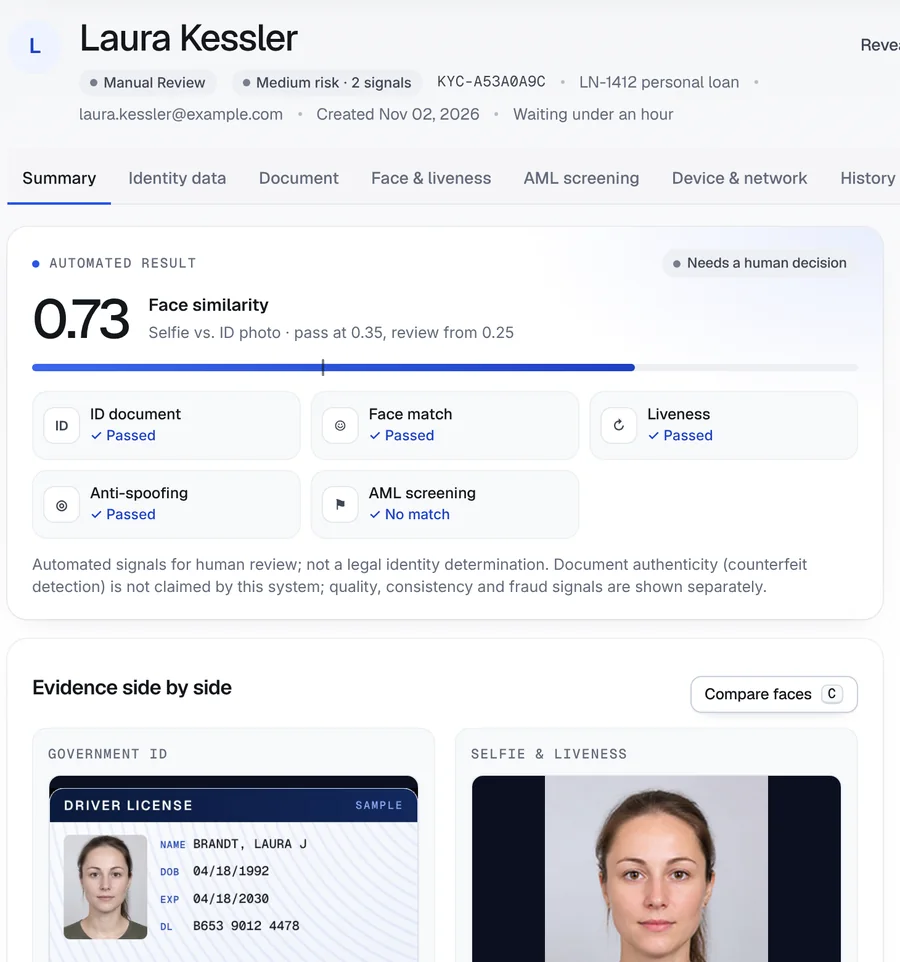
Screenshot from the Securely Verify dashboard
The onboarding problem
Fast online approvals attract fast fraud
Most application fraud arrives with a credit file that looks fine — because it belongs to someone else, or was built for the purpose.
Stolen identities
Real names, dates of birth and SSNs bought online pass a credit pull. The fraudster just isn’t the person on the file.
Synthetic identities
Fabricated people built from real and fake details grow credit histories, then borrow and disappear.
Repeat applicants
The same person applies again under a new name or email after being declined, or applies to several lenders at once.
What the rules ask for
Red Flags, safeguards and fair decisions
The rules below apply to many non-bank lenders. If you lend through a bank partner, its CIP requirements usually reach you by contract too.
Identity Theft Red Flags rule
16 CFR 681Creditors with covered accounts maintain a written program to identify, detect and respond to red flags of identity theft — including mismatched identifying information.
FTC Safeguards rule
16 CFR 314Non-bank lenders protect customer information with a written security program, access controls and encryption. That includes ID images and selfies you collect.
Adverse action notices
12 CFR 1002.9If you decline an application, Regulation B requires the specific principal reasons. Its sample reasons don’t include one for identity verification, so agree your wording with counsel.
Biometric privacy laws
740 ILCS 14Laws such as Illinois BIPA require informed written consent before collecting face data, and a published retention and destruction schedule.
General information, not legal advice. Rules change and depend on your charter, role and partners — confirm how they apply to you with your compliance team or counsel.
How Securely Verify fits
A live identity check in your funding flow
Run it before you pull credit, or before you fund — wherever it fits your process.
Confirm a real person matches the ID
Identity verificationID capture with barcode reading, a live selfie matched to the ID portrait, randomized active liveness and anti-spoofing.
Catch mismatches and repeat applicants
Fraud signalsSignals for a name that differs from the application, a face or document already used by another applicant, and VPN, hosting or Tor networks.
Hold funding until the result is in
API and webhooksCreate a verification from your loan origination system and receive a signed webhook when it’s decided.
Resolve a mismatch without starting over
Document collectionAsk for a marriage certificate, court order or proof of income through a secure document request.
Respect biometric consent
Consent and retentionApplicants consent before capture; images and face data are encrypted and deleted at the end of your retention period.
The workflow
One application, two signals, one decision
- Step 01Your team
Application received
A personal loan application arrives in the name of Laura Kessler. Your system creates a verification through the API and holds funding.
- Step 02Applicant
ID, selfie and live check
The applicant photographs a driver’s license, takes a selfie and completes the random head movements.
- Step 03Securely Verify
Two things don’t line up
The face matches the ID and liveness passes, but the ID reads “Laura J Brandt,” and the session came from a hosting or data-center network.
- Step 04Securely Verify
Flagged for the reviewer
Two medium signals set the case to medium risk, so the reviewer knows exactly what to look at before deciding.
- Step 05Your team
Ask for the missing piece
A name change has innocent explanations, so the reviewer asks for a marriage certificate or court order through a document request.
- Step 06Your team
Decide on the evidence
With the document reviewed, the reviewer approves or declines — and the reason is saved for your records and any adverse action notice.
Inside the dashboard
Every check passed — and it still needs a person
The face matches and liveness passed. The two signals tell the reviewer what to look at before anything is funded.
- 1
What needs attention
Medium risk with two signals, shown before anything else.
- 2
The face still matches
The selfie matches the portrait on the ID the applicant presented.
- 3
Approve, retry or reject
The reviewer’s decision and reasons are saved under their name.
Screenshot from the Securely Verify dashboard. Names and records in this walkthrough are fictional.
Risk signals
The two signals, with their evidence
Each signal shows what triggered it: how little of the application name appears on the ID, and the type of network used.
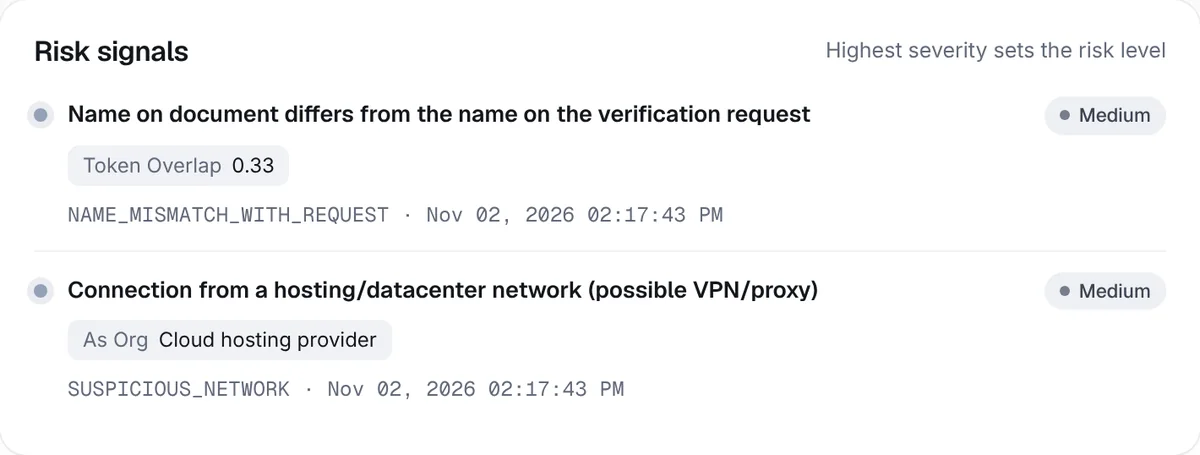
- 1
Name overlap
Only the first name on the application matches the name read from the ID.
- 2
Where the session came from
A hosting or data-center network, often a VPN or proxy — a signal to weigh, not a verdict.
Example outcome
Application LN-1412: waiting for one document
A fictional applicant at a fictional online lender.
- Identity checksID read from barcode, face match 0.73, liveness and anti-spoofing passed · no sanctions matchPassed
- Name on ID vs. application“LAURA J BRANDT” on the ID · “Laura Kessler” on the applicationMedium
- NetworkHosting or data-center network at the time of capture (possible VPN or proxy)Medium
- Next stepDocument request for proof of name changeRequested
Funding stays on hold until a reviewer records a decision.
Names, companies and records in this walkthrough are fictional.
Reading the result
What you can — and can’t — conclude
A verification result is evidence for your decision, not the decision itself. Here is where this one stops.
What the result supports
- The person in front of the camera matches the ID they presented, and was live at the time.
- The name on that ID is different from the name on the application.
- The session came from a hosting or data-center network rather than a typical home or mobile connection.
- Every step, signal and decision is recorded with who acted and when.
What it doesn’t tell you
- That the applicant is committing fraud — a married name or a legal name change explains a mismatch.
- That the SSN on the application belongs to them; we don’t verify SSNs or pull credit.
- Their income, employment or ability to repay.
- Whether they’ve applied to or borrowed from other lenders.
- That a hosting network on its own is grounds to decline — weigh it with everything else.
Keep reading
Guides for this workflow
Plain-English guides with links to the official sources. Browse all guides.
More use cases
All use casesFAQ
Common questions
Will identity verification slow down approvals?
Applicants verify on their phone in one sitting, with no app or account. Each result reaches your queue with its risk level and signals, so reviewers can clear clean cases quickly and spend their time on the ones that need it.
Does this stop synthetic identities?
It helps. A synthetic identity has no real person behind it, so it struggles to pass a live face match against a real ID. It isn’t a complete answer: combine it with your credit and data checks. Our synthetic identity guide explains where each check fits.
Can we hold funding until verification is done?
Yes. Create the verification through the API and wait for the signed webhook before you fund. The result includes the decision, risk level and signals.
What do we tell an applicant we decline?
Regulation B requires the specific principal reasons for adverse action. The sample reasons in its model forms don’t include one for identity verification, so agree wording with your counsel. Securely Verify keeps the reasons your reviewer recorded.
Do you check credit or SSNs?
No. Securely Verify confirms the person and their ID, screens sanctions lists and flags fraud signals. Credit, SSN and income checks come from your other providers.
How do you handle biometric consent?
Applicants see a consent screen before any capture, and the consent is recorded. Data is deleted automatically on a fixed schedule — ID images and selfies after 90 days, face-check video after 30.