Use case · Credit unions
Digital account opening for credit unions and community banks
Screenshot from the Securely Verify dashboard
The onboarding problem
Members join from home. A photo can’t carry that.
Remote account opening moves the identity check from a teller window to a camera you don’t control.
A photo upload proves little
An uploaded ID photo can be edited, borrowed or generated. Nothing ties it to the person holding the phone.
Deepfakes reached account opening
FinCEN has warned that criminals use AI-generated images and video to open accounts at financial institutions.
Joint accounts mean twice the work
Two applicants, often in two places, each needing the same identification — and a clean record that ties them together.
What the rules ask for
CIP, Red Flags and safe digital access
Identity verification supports these obligations. Your program — policies, risk assessment, training — remains your institution’s own.
Customer identification program (CIP)
31 CFR 1020.220Before opening an account, collect at least name, date of birth, address and an ID number, then verify identity within a reasonable time using documents, non-documentary methods or both. Keep the records.
Credit unions are covered
12 CFR 748.2NCUA requires every federally insured credit union to have a CIP that meets 31 CFR 1020.220 as part of its BSA compliance program.
Joint accounts
FinCEN CIP FAQsFinCEN’s CIP guidance treats each owner of a joint account as a customer: information can be gathered through one applicant, and the CIP notice must reach all owners.
Identity theft red flags
12 CFR 717, Subpart JFederal credit unions maintain a written program to detect and respond to identity theft red flags at account opening; banks follow their regulator’s equivalent rule.
Digital access and deepfakes
FFIEC authentication guidance (2021)The FFIEC’s 2021 guidance asks institutions to assess the risk of their digital channels and apply layered controls, and FinCEN’s deepfake alert lists red flags to watch at onboarding.
General information, not legal advice. Rules change and depend on your charter, role and partners — confirm how they apply to you with your compliance team or counsel.
How Securely Verify fits
A branch-quality check, on the member’s phone
The same verification for every applicant, whether they join online, by phone or in a branch.
Verify the applicant against a government ID
Identity verificationBoth sides of the ID are captured live; name, date of birth, number and expiry are read from the card and the barcode on U.S. driver’s licenses.
Prove a real person is present
Liveness and anti-spoofingRandomized head-movement prompts in real time, plus checks for screens, printouts and masks, and a match to the ID portrait.
Screen every new member
AML screeningNames are screened automatically against OFAC, UN, UK and EU sanctions lists, with ongoing monitoring if you choose.
Give examiners a trail
Audit log and PDF reportEvery view, decision and submission is logged with who, when and from where. A PDF report goes in the member file.
Protect member data
Security and retentionEncrypted evidence, two-factor staff sign-in, role-based access and automatic deletion at the end of your retention period.
The workflow
A joint membership, opened remotely
- Step 01Your team
Send two links
A member-services rep sends a link to each applicant, with the membership application number as the reference.
- Step 02Applicant
Each applicant verifies
Both photograph their driver’s license, take a selfie and complete the live check — no app and no branch visit.
- Step 03Securely Verify
One photo is too blurry
The second applicant’s ID photo is too blurry to read reliably. The reviewer sees it straight away in the evidence.
- Step 04Your team
Ask for a retake on the same link
The reviewer requests a retry with the reason “Document photo unreadable.” The applicant gets clear instructions and tries again.
- Step 05Securely Verify
The second attempt passes
The new photo is read, the face matches and liveness passes. Both attempts stay on the record.
- Step 06Your team
Approve and file
The reviewer approves both applicants and saves the PDF report to the member file.
Inside the dashboard
The retake, and the reason for it
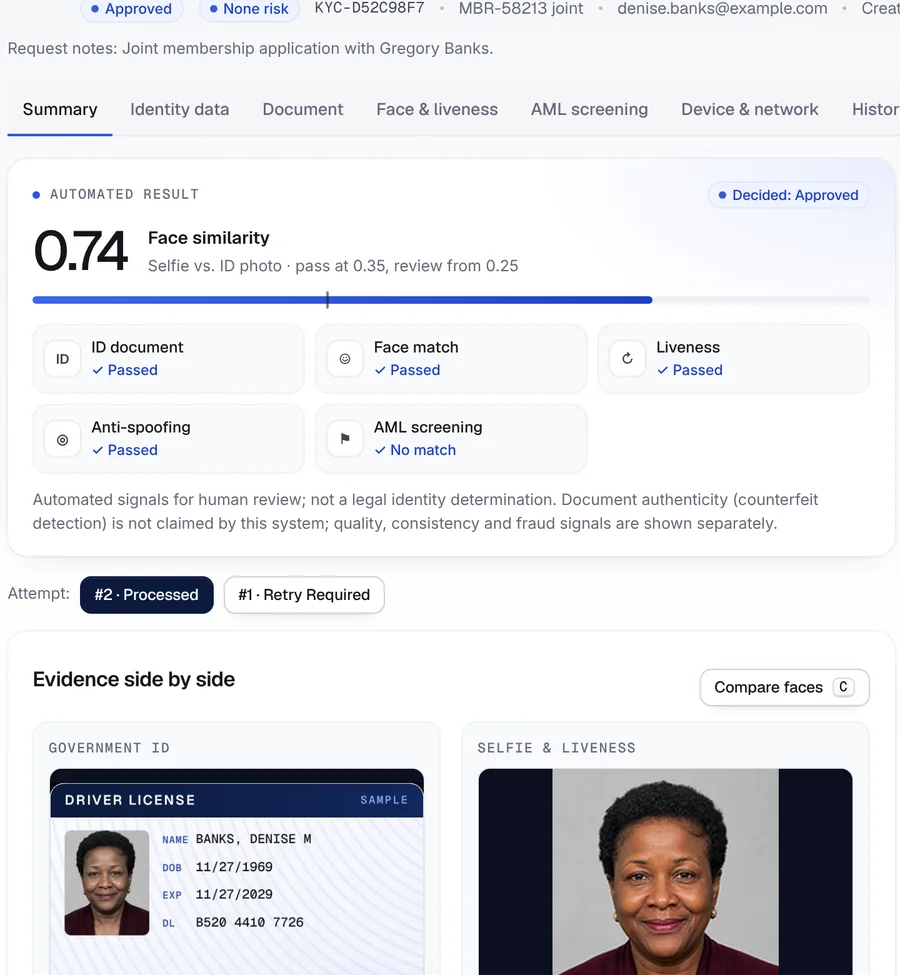
The second applicant passed on her second attempt. The first attempt, the retry request and the approval all stay on her record.
- 1
Both attempts kept
Switch between the blurry first attempt and the clear second one.
- 2
Why it was retried
The reason chosen by the reviewer is saved with the decision.
- 3
Joint application
The membership number links both applicants, and the request note says why.
Screenshot from the Securely Verify dashboard. Names and records in this walkthrough are fictional.
Joint accounts
Both applicants, one search
Search the membership number and both verifications appear together, each with its checks, reviewer and result.

- 1
One reference
The membership number ties the joint applicants together.
- 2
Checks at a glance
ID, face match, liveness and anti-spoofing for each person.
Example outcome
One joint membership, both applicants verified
A fictional couple joining a fictional community credit union.
- Gregory BanksID read from barcode, face match 0.77, liveness and anti-spoofing passed · no sanctions matchApproved
- Denise Banks · attempt 1ID photo unreadable (blur) — retake requested by reviewerRetry
- Denise Banks · attempt 2ID read from barcode, face match 0.74, liveness and anti-spoofing passed · no sanctions matchApproved
- Member filePDF report for each applicant, audit log of every stepSaved
Next: the credit union’s own CIP steps, such as verifying the address and ID number it collected.
Names, companies and records in this walkthrough are fictional.
Reading the result
What you can — and can’t — conclude
A verification result is evidence for your decision, not the decision itself. Here is where this one stops.
What the result supports
- Each applicant presented a government ID, and their live selfie matches the photo on it.
- Both completed a live check in the moment, with no sign of a replayed video, screen or printout.
- The details read from each ID’s barcode are consistent with the front of the card.
- Neither name matched the sanctions lists screened, and every step is time-stamped and attributed.
What it doesn’t tell you
- That the Social Security number given is valid or belongs to the applicant — we don’t verify SSNs.
- Anything about credit history, ChexSystems or prior account abuse.
- That the address on the application is where they live today.
- That an ID is not a high-quality counterfeit; document authenticity is not claimed.
- That your CIP is complete — identity verification is one part of the program your institution runs.
Keep reading
Guides for this workflow
Plain-English guides with links to the official sources. Browse all guides.
More use cases
All use casesFAQ
Common questions
Does this satisfy our CIP requirements?
It supports them. Securely Verify gives you documentary verification of the ID, a live match to the person and a full record. Your CIP also covers collecting the required information, any non-documentary checks, recordkeeping and notice — those remain your institution’s.
Can members join without visiting a branch?
Yes. Applicants verify on their phone’s browser through a personal link — no app, no account and no password. Staff can also use the same check for walk-in applicants.
How do joint accounts work?
Send a link to each applicant with the same membership or application number as the reference. Each person verifies on their own device, and both results appear together when you search that number.
What happens when an ID photo is blurry?
If the photo can’t be read reliably, the case comes to your team. A reviewer can request a retake on the same link with a reason, and both attempts stay on the record.
What will examiners be able to see?
Every view, decision and submission is logged with the staff member, time and network address, and each verification has a PDF report. See the banks and credit unions page for more.
Is biometric data kept?
Only for the retention period you set. Images and face data are encrypted, and deleted automatically when the period ends.