Use case · Payment providers
Merchant verification for payment providers
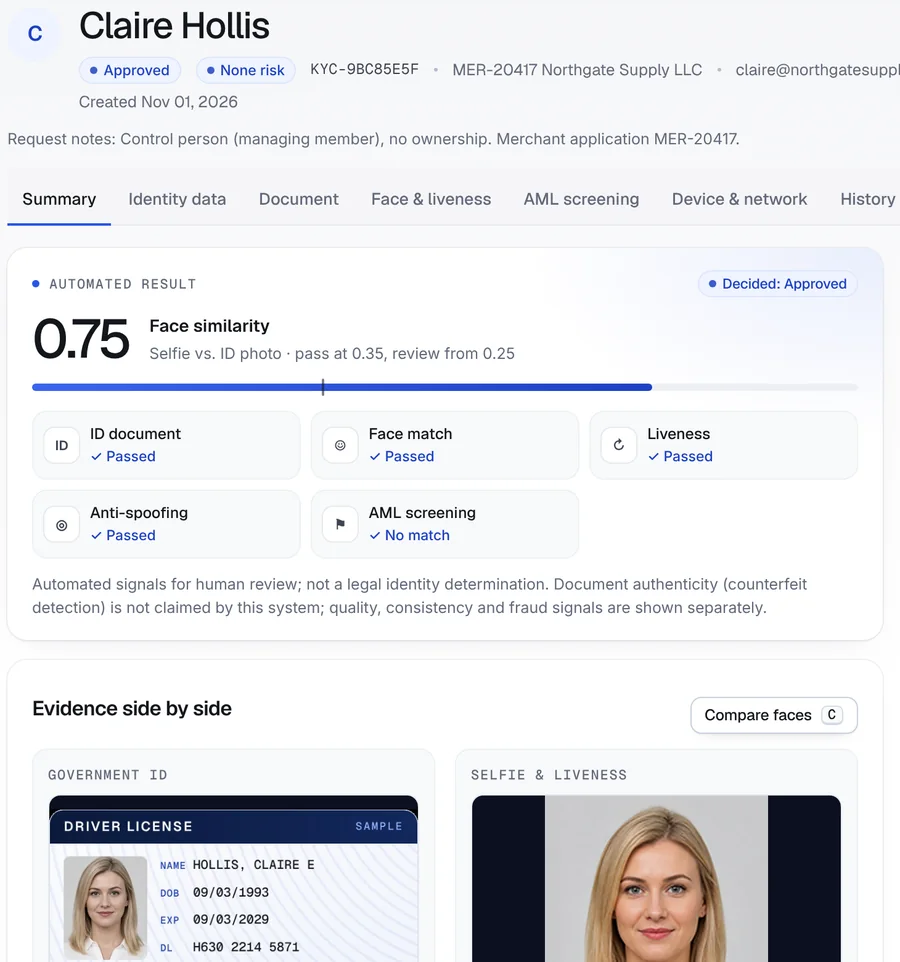
Screenshot from the Securely Verify dashboard
The onboarding problem
Merchants apply online. Owners don’t sit across a desk.
Merchant fraud usually starts with an identity that isn’t real, isn’t theirs, or hides the person really in control.
Owners you never meet
Applications list owners and officers by name. Without a live check, a stolen or borrowed identity looks the same as a real one.
Control hidden behind nominees
A business can be fronted by someone with a clean history while the person who runs it stays off the paperwork.
Documents scattered across email
IDs, articles and EIN letters arrive as attachments, in different inboxes, with no record of who reviewed what.
What the rules ask for
Beneficial owners, control persons and network rules
Which rules apply depends on your role — bank, acquirer, ISO or payment facilitator. These are the ones most merchant programs work to.
Customer due diligence (CDD) rule
31 CFR 1010.230Banks and other covered financial institutions identify and verify the beneficial owners of legal-entity customers: each person who owns 25% or more, plus one person with significant control. Non-bank providers usually inherit these expectations from their sponsor bank.
When verification is repeated
FinCEN order FIN-2026-R001FinCEN’s February 2026 exceptive relief lets covered institutions verify beneficial owners when a customer first opens an account, then again only when information looks unreliable or risk-based due diligence calls for it.
Third-party payment processors
FinCEN FIN-2012-A010FinCEN has warned that payment processors can be used to mask illegal or suspicious transactions, and that these relationships call for careful due diligence and monitoring of the merchants behind them.
Card-network screening
MATCH and VMSS overviewAcquirers check merchants and their principals against Mastercard MATCH and Visa VMSS before approval. Only acquirers can query these lists — Securely Verify does not.
Sanctions
OFAC compliance frameworkOFAC sanctions apply to every U.S. business. Screening owners and the business itself is a standard part of merchant onboarding.
General information, not legal advice. Rules change and depend on your charter, role and partners — confirm how they apply to you with your compliance team or counsel.
How Securely Verify fits
One merchant, every party on one record
Built from the same identity, document and screening tools you’d use anywhere else in the product — tied together with your merchant ID.
Prove each owner and control person is real and present
Identity verificationA personal link per person: government ID with barcode reading, a live selfie matched to the ID portrait, randomized active liveness and anti-spoofing.
Collect formation and tax documents
Document collectionA secure request for articles, an EIN letter or an operating agreement — uploaded or photographed, kept with the case, every view logged.
Screen people and the business
AML screeningOwners are screened automatically against OFAC, UN, UK and EU sanctions lists; the business name can be screened too, with ongoing monitoring.
Keep the merchant together
Business verification (KYB)Use your merchant ID as the internal reference and every verification and document request for that merchant sits in one search.
Fit it into your onboarding flow
API and webhooksCreate links from your merchant application and receive signed webhooks when each person finishes.
The workflow
From application to approved merchant
- Step 01Your team
Open the merchant case
The application lists two people: a 50% owner and a managing member with no ownership. Your analyst uses the merchant ID as the reference for both.
- Step 02Securely Verify
Send each person their own link
Each person gets a personal, expiring link by email. No app, no account — they verify from their phone, wherever they are.
- Step 03Applicant
ID, selfie and a live check
Each person photographs their driver’s license, takes a selfie and follows a few random head movements.
- Step 04Securely Verify
Checks and screening run
The ID is read, the face is matched to the ID portrait, liveness and anti-spoofing are scored, and the name is screened against sanctions lists.
- Step 05Applicant
Documents arrive on the same record
The business uploads its articles of organization, EIN letter and operating agreement through a document request with the same merchant ID.
- Step 06Your team
Decide, then finish your own checks
A reviewer approves each person and the document request. Your acquirer-side checks — MATCH, VMSS, underwriting — sit alongside.
Inside the dashboard
The control person’s verification
The managing member verified from her own phone. Your reviewer sees the result, the evidence and the request note that explains her role.
- 1
Her role, in the request note
The note added when the link was sent records that she controls the business but owns none of it.
- 2
Every check on one screen
ID document, face match, liveness, anti-spoofing and sanctions screening results at a glance.
- 3
A named decision
Approved by a reviewer, with the time and reason saved to the audit log.
Screenshot from the Securely Verify dashboard. Names and records in this walkthrough are fictional.
Business documents
Formation documents, on the same merchant
The document request carries the same merchant ID, so the articles, EIN letter and operating agreement sit next to the owners’ verifications.

- 1
Typed documents
Each upload is labeled — articles, EIN letter, operating agreement — with file details.
- 2
Same merchant ID
Search the merchant ID and every verification and document request for it comes up together.
- 3
Reviewed and logged
The analyst’s decision, and every view or download, is recorded.
Example outcome
Northgate Supply LLC: identity checks complete
A fictional e-commerce seller applying for card processing.
- Rafael Moreno · owner, 50%ID, face match, liveness, anti-spoofing passed · no sanctions matchApproved
- Claire Hollis · managing member, 0%ID, face match, liveness, anti-spoofing passed · no sanctions matchApproved
- Business documentsArticles of organization, EIN letter, operating agreement receivedApproved
- Business name screeningNorthgate Supply LLC · no sanctions matchClear
Next: the acquirer’s own MATCH and VMSS checks and underwriting.
Names, companies and records in this walkthrough are fictional.
Reading the result
What you can — and can’t — conclude
A verification result is evidence for your decision, not the decision itself. Here is where this one stops.
What the result supports
- The two people who verified presented a government ID, and the live selfie of each matches the photo on their ID.
- Each completed a live check in the moment, with no sign of a screen, printout or mask.
- Neither person, nor the business name, matched the OFAC, UN, UK or EU sanctions lists screened.
- You have a time-stamped record of who sent, completed, viewed and decided each step.
What it doesn’t tell you
- That the ownership percentages on the application are true — the business states and certifies them.
- That the LLC exists or is in good standing; Securely Verify doesn’t check Secretary of State records.
- That the merchant or its principals are absent from MATCH or VMSS — only acquirers can check those lists.
- That the documents are genuine originals; collected documents are reviewed by your team, not authenticated.
- That the business model, bank account or processing history is low-risk.
Keep reading
Guides for this workflow
Plain-English guides with links to the official sources. Browse all guides.
More use cases
All use casesFAQ
Common questions
Do we need to verify every owner?
For legal-entity customers, the CDD rule asks covered institutions to verify each person owning 25% or more and one control person. Many payment programs go further under their sponsor bank’s policy. Securely Verify sends a link to anyone you choose, so you can follow your own threshold.
Can owners verify from different places, at different times?
Yes. Each person gets a personal link and verifies from their own phone. The case stays open until everyone has finished, and you can resend or replace a link if it expires.
Does Securely Verify check MATCH or VMSS?
No. Mastercard MATCH and Visa VMSS are only available to acquirers. Run those checks through your acquirer as usual; Securely Verify covers identity, documents and sanctions screening.
Can we check that the business is registered?
Not automatically. We don’t query Secretary of State or IRS records. You can request formation documents and an EIN letter through a document request, and our EIN guide explains where an EIN can be confirmed.
Can we start this from our own merchant application?
Yes. The REST API creates verification and document links, and signed webhooks tell your system when each person finishes. The free trial includes API access.
How long is merchant data kept?
You set the retention period. Images and personal data are deleted automatically when it ends, and the deletion is recorded. See security for details.